
Polish every post without breaking a single tag
Content Polisher scans your WordPress site for double spaces, misplaced punctuation, wrong dashes and empty paragraphs. Preview each fix, apply it safely, undo it anytime.
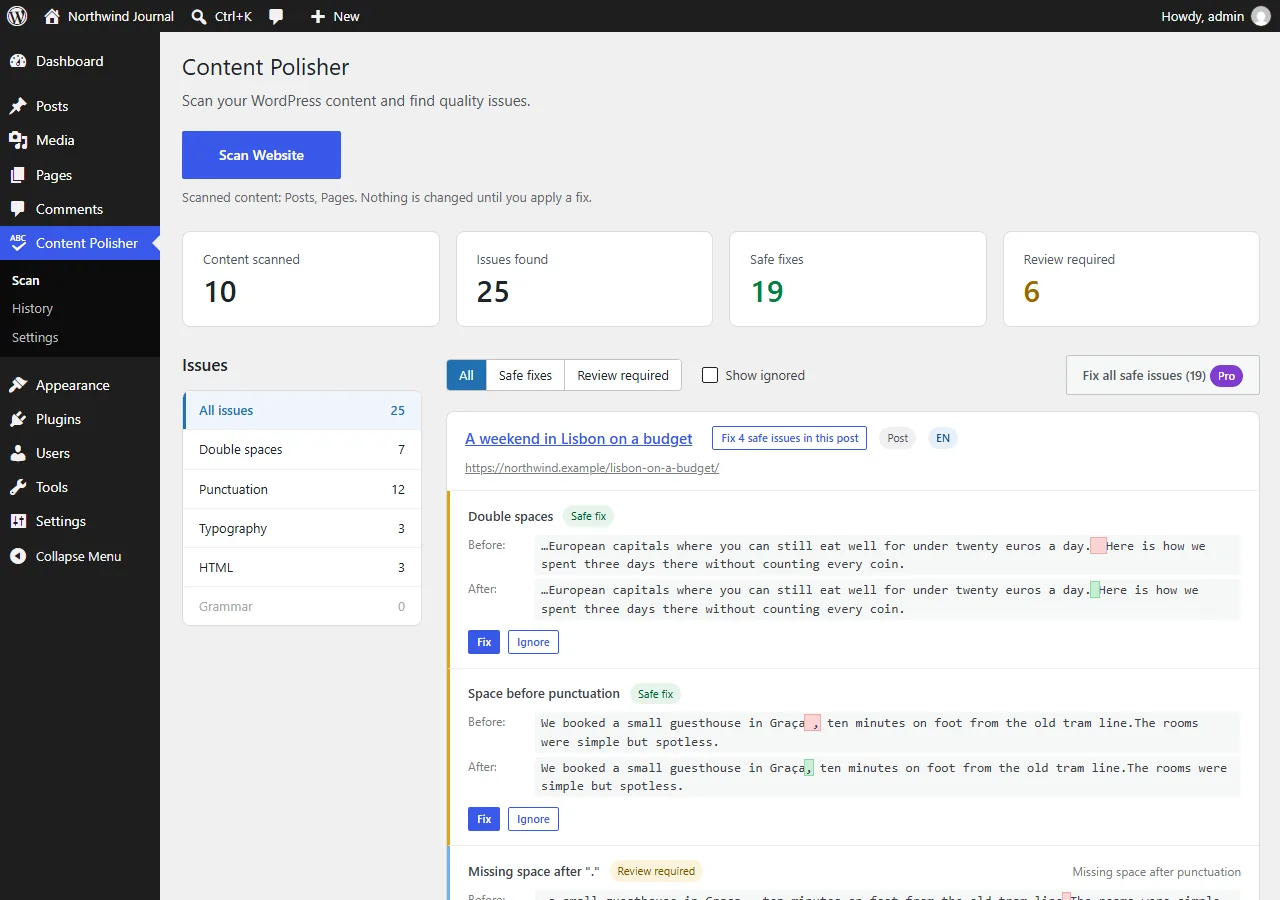
- Before / After preview for every issue
- Only visible text changes — markup, links and blocks stay intact
- Every change is backed up and can be undone
- Runs on your server: no account, no API key, no content sent anywhere
Requires WordPress 6.5+ and PHP 8.1+. English, French, Ukrainian and Russian content.
Small mistakes, fixed at scale — safely
Hundreds of posts written by different people, pasted from Word or Google Docs, edited over years. Content Polisher finds the little things readers notice and fixes them without touching anything else.
Scan the whole site
Posts, pages and public custom post types, in small batches that large sites handle easily. Issues are grouped by type.
Preview before you fix
Every issue shows the exact Before / After text. Fix one issue, or all safe issues of a post in one click.
Undo anything
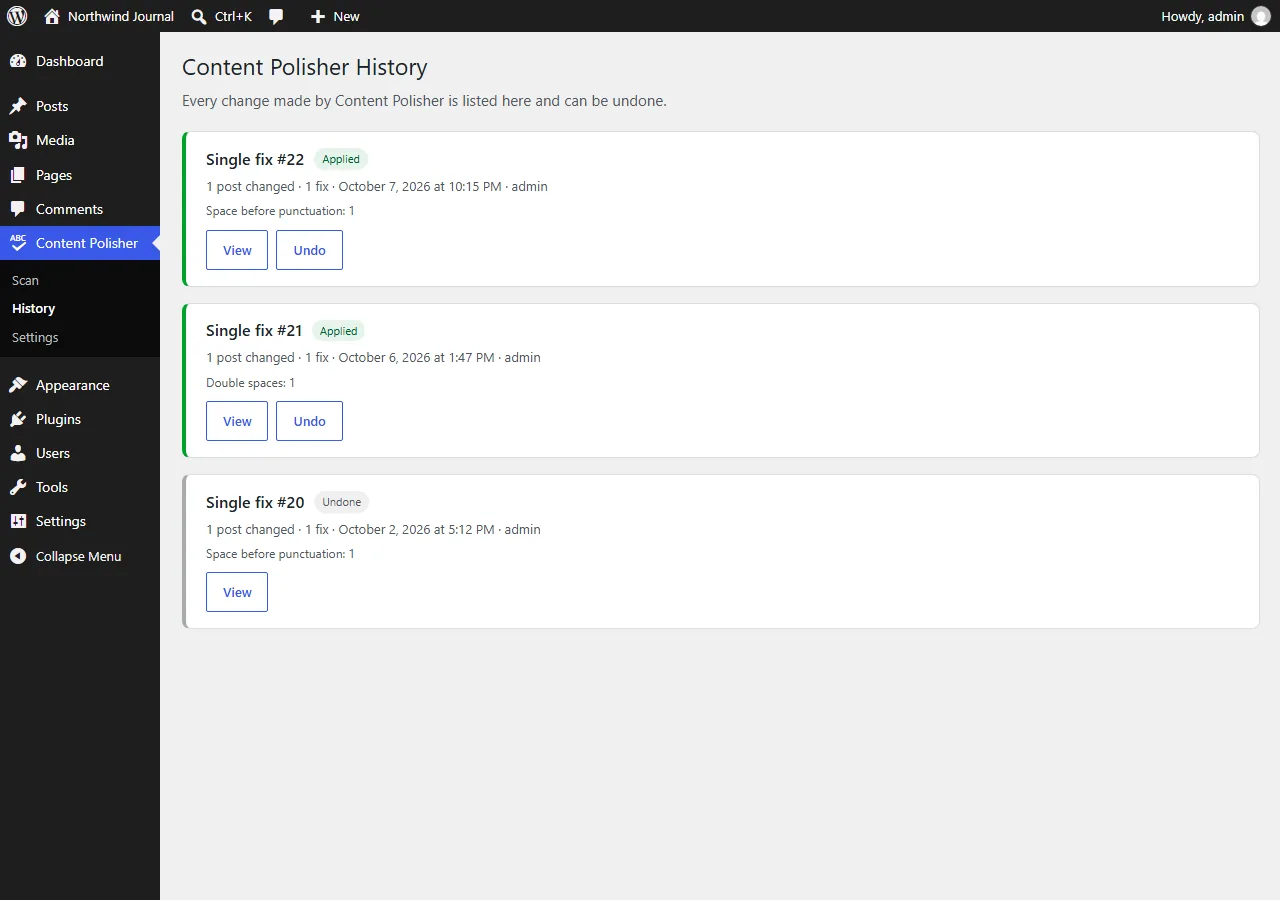
The original is stored before every change. Undo from History, and you are warned if a post was edited after the fix.
Markup stays untouched
Only the visible text between tags changes. Links, attributes, shortcodes, code and block markup keep every byte.
Language-aware
French spacing before ; : ! ? is kept, not "fixed". Each post is checked in its own language, with Polylang and WPML support.
Private by design
Everything runs on your server. No account, no API key, no external service — your content never leaves your site.
What it finds
Clear-cut mistakes are fixed as safe fixes. Anything that could be intentional is only suggested and waits for your review.
Hello··world → Hello·worldHello , world → Hello, world — kept where French typography requires itHello,world → Hello, world — URLs, numbers and file names are left alone-- → —, spaced hyphens between words → dashes (Ukrainian, Russian, French), non-breaking spaces in French<p></p>, <p> </p> and empty paragraph blocks<br><br> — suggestion onlyFull list with examples in the rules documentation.
Four steps, no surprises
- Scan. Open Content Polisher and click Scan Website.
- Review. Issues are grouped by type with a Before / After preview.
- Fix. Fix one issue, or every safe issue of a post at once.
- Undo. Changed your mind? Undo from the notice or the History page.
Built to never break a page
- Code is never touched:
pre,code, scripts, styles, code blocks and custom HTML blocks are skipped. - URLs, e-mail addresses, domains, numbers and abbreviations are recognised and left alone.
- Gutenberg blocks stay valid; page-builder layouts (Elementor, Bricks, Oxygen…) are skipped.
- Posts open in the editor by someone else are skipped.
- WordPress revisions are created as usual, on top of Content Polisher's own backup.
Need more? Check ACF fields, clean up the whole site, proofread with AI
The free plugin is complete on its own. The optional Pro add-on extends it for sites with custom fields, lots of content or stricter quality needs.
ACF fields, blocks & options
Text, Text Area and WYSIWYG fields — inside Repeater, Group and Flexible Content too — with the field shown on every issue.
Fix the whole site at once
Apply every safe fix across the site in one batched operation — and undo all of it from History.
AI proofreading
Spelling and grammar suggestions from Claude or OpenAI with your own API key — on demand, never applied automatically.
Frequently asked questions
Will it break my HTML or my blocks?
No. Content Polisher never rewrites markup: it edits the text between tags and keeps every other byte exactly as it was. Edited blocks are checked so they stay valid.
Is my content sent anywhere?
No. Scans and fixes run entirely on your server. Only the optional AI proofreading in Pro sends text — to the AI provider you choose, with your own API key, after you confirm.
Do I need an account or a license?
No. The free plugin works without an account, a license or an API key. A license is only needed for the optional Pro add-on.
Can I undo a fix?
Yes. Every change is listed on the History page and can be undone. If a post was edited after the fix, you are asked before anything is overwritten.
Does it check custom fields?
The free plugin checks the post content. Content Polisher Pro also checks Advanced Custom Fields (and Secure Custom Fields) in posts, ACF blocks and options pages.
More answers in the FAQ.
Start polishing your content
Free on WordPress.org. Add Pro whenever you need it.